Additions or changes to this page might not show up on your computer if you have an older version in your internet cache. You may wish to click on the Refresh button in your browser to be certain that you see any changes.
Class Related Items
The text for the class is "Introduction Electroacoustics & Audio Amplifier Design" by W. Marshall Leach, Jr., ISBN 0-7575-0375-6.
Before coming into my office, please turn your cell phone off.
Making the Grade by Physics Professor Kurt Weisenfeld. You can read a student's response here.
Chapters 1 - 12 Formula Sheet Use of this is allowed on quizzes. No additional material may be written on it. Additions or corrections may be made before quizzes.
Electroacoustics Glossary of Symbols. You may use a copy of this on the quizzes. No additional material may be written on it.
The Perception of Pitch. The pitch of a sound wave is closely related to its frequency or periodicity - but the exact nature of that relation remains a mystery. A very interesting article from the 1974 issue of American Scientist published by Sigma Xi.
A paper that describes the design of Zobel matching networks can be read here. You can read see the Mathcad sheet which was used to produce the plots in Figures 7 and 8 in the paper here.
The following links are to the numerical tables from which the vented-box design charts in the book were plotted: QL = 03, QL = 05, QL = 07, QL = 10, QL = 20, QL = infinity
SPICE Netlists: Infinite-Baffle, Closed-Box, Vented-Box
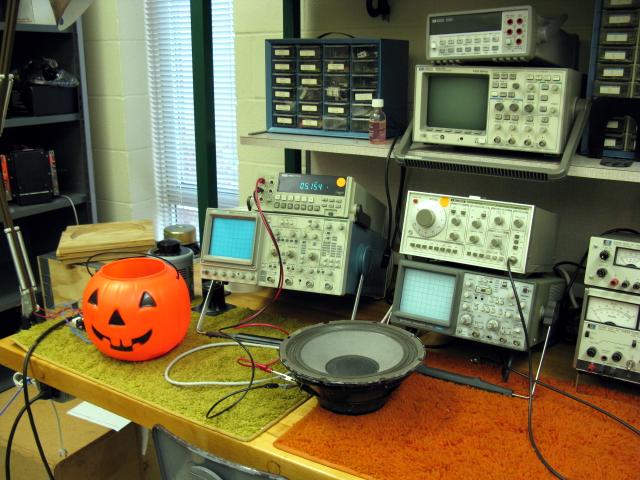
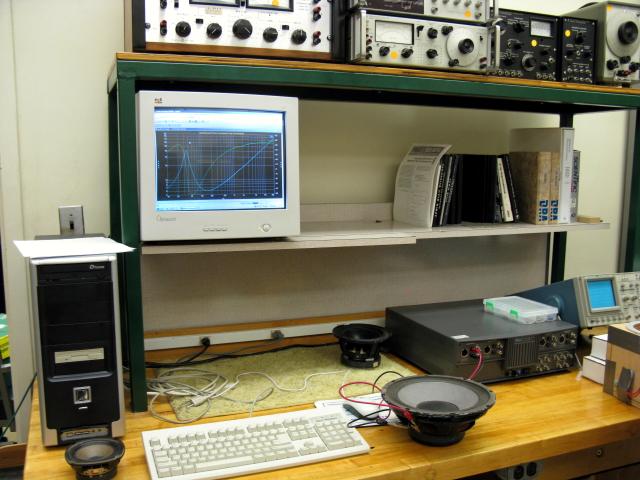
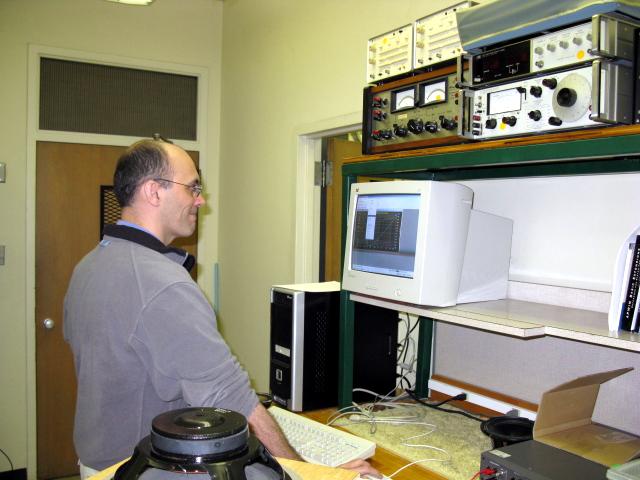
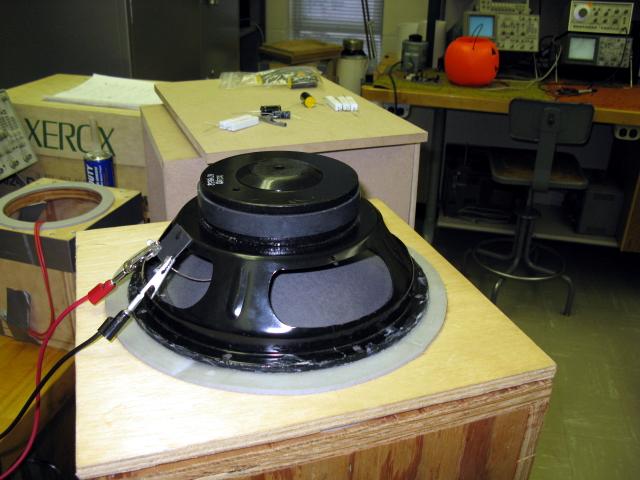
The following pictures show the laboratory setup for measuring the voice-coil impedance of loudspeakers. The basic instrument is the computer controlled Audio Precision Analyzer II.
Picture 01 - Measuring the voice-coil resistance with the ohmmeter.
Picture 02 - Loudspeaker driver connected to the Audio Precision Analyzer II.
Picture 03 - Closeup view of the speaker and analyzer.
Picture 04 - Dr. Allen Robinson making the measurements.
Picture 05 - Screenshot showing the measured magnitude and phase of the impedance.
Picture 06 - The loudspeaker mounted on the compliance test box.
LTSpice
The SPICE examples in the 4th edition of the text used LTSpice for the analysis. This version of SPICE is distributed by Linear Technology and has become the defacto standard for the "do it yourself" electronics and audio communities. Unlike other free versions, there are no limits on the number of devices in a circuit. Here are the links:
Linear Technology Software Page
LTSpice Tutorial
LTSpice Guide
These are the LTSpice files that are in the 4th edition of the text. The crossover network example contains both a woofer and a midrange driven from a single power amplifier with crossover networks. There is an auxiliary RLC circuit that connects to the midrange voice coil for impedance correction.
Infinite Baffle File from Chapter 6.
Closed-Box File from Chapter 7.
Vented-Box File from Chapter 8.
Crossover Example File from Chapter 10.
Fall 2010 Documents
Syllabus
Homework Assignments
You may work with a partner in submitting homework problems. Only one writeup should be submitted. Be sure to put both names on the cover sheet.
Homework Guidelines (Please read and follow these guidelines. They were originally written to minimize student complaints about an ECE 3050 GTA grader.)
- Chapter 1 problems - 3, 4, 7, 10, 11, 13, 15, and 19.
- Chapter 2 problems - 2, 4, 5, 8, 13, 14, 15, 17, 19, 23, and 25.
- Chapter 3 problems - 2, 3, 4, 5, 7, 9, 11, and 12.
- Chapter 4 problems - 1, 2, 3, 4, 5, 6, and 7.
- Chapter 5 problems - 1,2, 3, and 5.
- Chapter 6 problems - 3, 4, 10, 12, 13, 24, 28, and 30. In problem 30, if the measured impedance at 2 kHz is in the problem statement, it should be omitted for it is there by error. Use only the measured impedance at 20 kHz for the calculations.
- Additional problem for Chapter 6 - Click here to download the LTSpice program used to generate the Bode plots in Figure 6.16 of the text. Run LT Spice to generate curves a, b, and c in Figure 6.16. The SPICE file for the 3 curves in the figure is here. Increase the diaphragm mass MMD to make QTS = 1/(2)^0.5. Run LTSpice to generate the new curve. Decrease the suspension compliance CMS to make QTS = 1/(2)^0.5. Run LTSpice to generate the new curve. You should have 5 curves for this problem, the 3 in the text and 2 additional ones. Compare the 5 curves and determine which one gives the lowest cutoff frequency and the highest on-axis pressure sensitivity. You can use the "Duplicate" command in LTSpice to make copies of the circuit so that all 5 can be run at the same time. The only catch is that you have to have different labels and controlling source labels for each circuit. This is illustrated for the 3 circuits in the file. If you run each case separately, you will have to export the data and plot all 5 curves with some other software such as Mathcad.
- Chapter 7 problems - 4, 5, 6, 7, and 8.
- Chapter 8 problems - 2, 3, 4, 5, 9, and 10.
- Chapter 10 problems - 1, 2, 3 (if it is not there, add "crossover network" between "midrange" and "is" in the second sentence), 6, 8, 11, 12, and 13.
- Chapter 12 - problems 1, 2, 6, 7, and 16.
Fall 2010 Design Project
You may use any version of SPICE that you prefer. The examples posted for the project use LTSpice, which is the version used in the examples in the course text. Some useful links for LTSpice are
Linear Technology Software Page
LTSpice Tutorial
LTSpice Guide
The following LTSpice files are the ones in the 4th edition of the text. Any of these can be used with the design project, but the numbers must be changed. The crossover network example contains both a woofer and a midrange driven from a single power amplifier with crossover networks. There is an auxiliary RLC circuit that connects to the midrange voice coil for impedance correction. The design of this network is discussed in the text.
Infinite Baffle File from Chapter 6
Closed-Box File from Chapter 7
Vented-Box File from Chapter 8
Crossover Example File from Chapter 10
You may work with a partner and submit one report or work individually.
If you have a driver that you would like to use, you may make an appointment to come in the Audio Laboratory and measure it. Otherwise, download the speaker data file as follows:
Preliminary
Take the number for the day of your birthday or your partner's birthday (1 through 31). Divide that number by 31, multiply by 13, and round it off to the nearest digit. For example, if your birthday is on the 17th of the month, your number would be 07. For single digit numbers, you must include a leading zero. The files you download are:
http://users.ece.gatech.edu/~mleach/ece4445/vcimped/NM_off.txt
http://users.ece.gatech.edu/~mleach/ece4445/vcimped/NM_on.txt
where NM is your file number.
Use the measured loudspeaker data and the Mathcad sheet linked below (or any other math software) to calculate the driver parameters and plot the measured voice-coil impedance and the simulated impedance. (Note: the x-axis values for the two plots will not be the same. You must use separate x-axis arrays for them.) If you do not get the plots to agree, you have not calculated the parameters correctly. The methods of calculating these were covered in class and they are in Chapter 11 of the text. The parameter LE must be experimentally ajdusted, i.e. tweaked, to obtain the best match in the midband region. A typical value might be around 0.01 H. With some drivers, LE is an open circuit.
Mathcad 7 sheet for calculating the small-signal parameters of the driver. Download this file and use Mathcad to open it. The sheet reads the two data files offbox.txt and onbox.txt. These files must contain the data measured with the Audio Precision System II Analyzer. There should be no headers in these files. Here is a PDF of an example application of the Mathcad sheet. The driver is a Dayton 18-inch dual voice-coil driver with the two voice coils connected in parallel. This is a real monster woofer that was used by a group of students in a senior design project.
Calculate the element values for the infinite baffle SPICE simulation. You may use this Mathcad 7 Sheet. Plot the voice-coil electrical impedance calculated with SPICE and the measured impedance on the same axes. You can export the data calculated by SPICE as an ascii file that can be imported into Mathcad with the READPRN statement. For the Mathcad plots, you must specify 2 y-axis arrays and 2 x-axis arrays to be plotted. The x-axis values are not the same for the two sets of y-axis values. If these two plots do not agree, the SPICE netlist contains errors. You may use this Cadence/PSpice Infinite Baffle Netlist or this LTSpice Graphic File. The numbers in the LTSpice file are for one of the examples in the text. The numbers must be changed for the design project. Include the electrical input impedance, the on-axis pressure, and the diaphragm displacement.
Graphics in LTSpice, e.g. circuit diagrams and graphs, can be exported as WMF files by clicking on "Tools/Write to a wmf file." This file can be copied and pasted into Word and resized for your report.
A preliminary design report consisting of the calculated parameters, the comparison of the measured and Mathcad calculated voice-coil impedances, and the SPICE simulation of the driver in an infinite baffle is due on Friday, November 12. All plots must be titled and the axes labeled. If more than one plot is on a graph, each plot must be labeled.
Final Project
For all of the following simulations, add the resistor LE from your Mathcad parameter sheet to the LTSpice circuit. This inductor is in parallel with the GZe source.
Calculate the element values for the closed-box SPICE simulation. You may use this Cadence/PSpice Closed Box Netlist or this LTSpice Graphic File. The numbers in the LTSpice file are for the example in the text. They must be changed for the design project. For your driver data, perform the same SPICE simulations that are at the end of Chapter 7 of the text. Perform the sumulations for two values of LE - the value from your Mathcad parameter sheet and for the value LE = 1E-12. The latter value is essentially a short circuit in the simulation. The difference between the two simulations illustrates the effect of the voice-coil inductance on the driver.
Calculate the element values for the vented-box SPICE simulation. You may use this Cadence/PSpice Vented Box Netlist or this LTSpice Graphic File. The numbers in the LTSpice file are for the example in the text. They must be changed for the design project. For your driver data, perform the same SPICE simulations that are at the end of Chapter 8 of the text. Perform the sumulations for two values of LE - the value from your Mathcad parameter sheet and for the value LE = 1E-12.
Design a second-order low-pass crossover network for the driver. Calculate the element values for a load resistor equal to the value of RE for your driver. Repeat the closed-box and vented-box simulations for the two values of LE.
In your report, compare the box volumes and the lower cutoff frequencies of the closed-box and vented-box systems. Does the crossover network have any effect on the lower cutoff frequency? Discuss the effect of the voice-coil inductance on the overall frequency response of the systems.
The due date for the final design report is Friday, December 3. You can see an example report here.
Spring 2010 Documents
The GTA for the class is Chris Burdett. His hours in the Tutotial Lab are Monday from 2:00 pm to 4:00 pm and Tuesday from 11:00 am to noon. His email address is chrisburdett_at_gatech_dot_edu.
Spring 2010 Design Project
You may use any version of SPICE that you prefer. The examples posted for the project use LTSpice, which is widely used by the "do it yourself" audio community. Here are some pertinent links for LTSpice::
Linear Technology Software Page
LTSpice Tutorial
LTSpice Guide
The following LTSpice files are the ones in the 4th edition of the text. Any of these can be used with the design project, but the numbers must be changed. The crossover network example contains both a woofer and a midrange driven from a single power amplifier with crossover networks. There is an auxiliary RLC circuit that connects to the midrange voice coil for impedance correction. The design of this network is discussed in the text.
Infinite Baffle File from Chapter 6
Closed-Box File from Chapter 7
Vented-Box File from Chapter 8
Crossover Example File from Chapter 10
For the design project, you may come into the Audio Laboratory and measure one of your own drivers or a driver that we have in the laboratory. You can make an appointment with the GTA to do this. Alternately, you can use one of the measured data files assigned in email to the class. You may work individually or in groups of two. In the latter case, submit only a single report.
Use the measured loudspeaker data and the Mathcad sheet linked below (or any other math software) to calculate the driver parameters and plot the measured voice-coil impedance and the simulated impedance. (Note: the x-axis values for the two plots will not be the same. You must use separate x-axis arrays for them.) If you do not get the plots to agree, you have not calculated the parameters correctly. The methods of calculating these were covered in class and they are in Chapter 11 of the text. The parameter LE must be experimentally ajdusted, i.e. tweaked, to obtain the best match in the midband region. A typical value might be around 0.01 H. With some drivers, LE is an open circuit.
Mathcad 7 sheet for calculating the small-signal parameters of the driver. Download this file and use Mathcad to open it. The sheet reads the two data files offbox.txt and onbox.txt. These files must contain the data measured with the Audio Precision System II Analyzer. There should be no headers in these files. Here is a PDF of an example application of the Mathcad sheet. The driver is a Dayton 18-inch dual voice-coil driver with the two voice coils connected in parallel. This is a real monster woofer that was used by a group of students in a senior design project.
Calculate the element values for the infinite baffle SPICE simulation. You may use this Mathcad 7 Sheet. Plot the voice-coil electrical impedance calculated with SPICE and the measured impedance on the same axes. You can export the data calculated by SPICE as an ascii file that can be imported into Mathcad with the READPRN statement. For the Mathcad plots, you must specify 2 y-axis arrays and 2 x-axis arrays to be plotted. The x-axis values are not the same for the two sets of y-axis values. If these two plots do not agree, the SPICE netlist contains errors. You may use this Cadence/PSpice Infinite Baffle Netlist or this LTSpice Graphic File. The numbers in the LTSpice file are for one of the examples in the text. The numbers must be changed for the design project. Include the electrical input impedance, the on-axis pressure, and the diaphragm displacement.
A preliminary design report consisting of the calculated parameters, the comparison of the measured and Mathcad calculated voice-coil impedances, and the SPICE simulation of the driver in an infinite baffle is due on Monday, April 5.
Calculate the element values for the closed-box SPICE simulation. You may use this Cadence/PSpice Closed Box Netlist or this LTSpice Graphic File. The numbers in the LTSpice file are for the example in the text. They must be changed for the design project. For your driver data, perform the same SPICE simulations that are at the end of Chapter 7 of the text.
Calculate the element values for the vented-box SPICE simulation. You may use this Cadence/PSpice Vented Box Netlist or this LTSpice Graphic File. The numbers in the LTSpice file are for the example in the text. They must be changed for the design project. For your driver data, perform the same SPICE simulations that are at the end of Chapter 8 of the text.
Choose either the closed-box or the vented-box woofer from above. Add a low-pass crossover network (any order) with a crossover frequency of 400 Hz. Add the midrange from the crossover network example in the text with a high-pass crossover network (any order). The LTSpice circuit for the midrange is linked above. Use SPICE to calculate the on-axis pressure response of the woofer with its crossover network by itself. Do the same for the midrange. As a final step, look at the combined responses of the midrange and the woofer, sum and difference connections. The plots will be similar to the ones in the Crossover Networks chapter of the text. Tweak the crossover network for the best overall response. Impedance matching networks in parallel with the voice coil of either driver to optimize the response are optional.
The due date for the final design report is Wednesday, April 28. You can see an example report here.
Quiz Solutions
Quiz 1, Quiz 2, Quiz 3
Fall 2009 Documents
Quiz Solutions
Quiz 1, Quiz 2, Quiz 3
Fall 2009 Design Project
The SPICE examples posted for the project use LTSpice, which is widely used by the "do it yourself" audio community. Here are the links:
Linear Technology Software Page
LTSpice Tutorial
LTSpice Guide
These are the LTSpice files that will be in the 4th edition of the text. Any of these can be used with the design project, but the numbers must be changed. The crossover network example contains both a woofer and a midrange driven from a single power amplifier with crossover networks. There is an auxiliary RLC circuit that connects to the midrange voice coil for impedance correction. - Infinite Baffle File, Closed-Box File, Vented-Box File, Crossover Example File
- Use the measured loudspeaker data and the Mathcad sheet below (or any other math software) to calculate the driver parameters and plot the measured voice-coil impedance and the simulated impedance. (Note - the x-axis values for the two plots will not be the same. You must use separate x-axis arrays for them.) If you do not get the plots to agree, you have not calculated the parameters correctly. The methods of calculating these were covered in class and they are in Chapter 11 of the text. The parameter LE must be experimentally ajdusted, i.e. tweaked, to obtain the best match in the midband region. A typical value might be around 0.01 H. With some drivers, LE is an open circuit.
- Mathcad 7 sheet for calculating the small-signal parameters of the driver. Download this file and use Mathcad to open it. The sheet reads the two data files offbox.txt and onbox.txt. These files must contain the data measured with the Audio Precision System II Analyzer. There should be no headers in these files. Here is a PDF of an example application of the Mathcad sheet. The driver is a Dayton 18-inch dual voice-coil driver with the two voice coils connected in parallel. This is a real monster woofer.
- Calculate the element values for the infinite baffle SPICE simulation. You may use this Mathcad 7 Sheet. Plot the voice-coil electrical impedance calculated with SPICE and the measured impedance on the same axes. You can export the data calculated by SPICE as an ascii file that can be imported into Mathcad with the READPRN statement. For the Mathcad plots, you must specify 2 y-axis arrays and 2 x-axis arrays to be plotted. The x-axis values are not the same for the two sets of y-axis values. If these two plots do not agree, the SPICE netlist contains errors. You may use this Cadence/PSpice Infinite Baffle Netlist or this LTSpice Graphic File. The numbers in the LTSpice file are for one of the examples in the text. They must be changed for the design project. Include the electrical input impedance, the on-axis pressure, and the diaphragm displacement.
- Calculate the element values for the closed-box SPICE simulation. You may use this Cadence/PSpice Closed Box Netlist or this LTSpice Graphic File. The numbers in the LTSpice file are for the example in the text. They must be changed for the design project. For your driver data, perform the same SPICE simulations that are at the end of Chapter 7 of the text.
- Calculate the element values for the vented-box SPICE simulation. You may use this Cadence/PSpice Vented Box Netlist or this LTSpice Graphic File. The numbers in the LTSpice file are for the example in the text. They must be changed for the design project. For your driver data, perform the same SPICE simulations that are at the end of Chapter 8 of the text.
- Choose either the closed-box or the vented-box woofer from above. Add a low-pass crossover network (any order) with a crossover frequency of 400 Hz. Add the midrange from the crossover network example in the text with a high-pass crossover network (any order). The LTSpice circuit for the midrange is linked above. Use SPICE to calculate the on-axis pressure response of the woofer with its crossover network by itself. Do the same for the midrange. As a final step, look at the combined responses of the midrange and the woofer, sum and difference connections. The plots will be similar to the ones in the Crossover Networks chapter of the text. Tweak the crossover network for the best overall response. Impedance matching networks in parallel with the voice coil of either driver to optimize the response are optional.
- The due date for the final project is Friday, November 27. You can see an example report here.
Spring 2009 Documents
Spring 2009 Design Project
- Use the measured loudspeaker data and the Mathcad sheet below (or any other math software) to calculate the driver parameters and plot the measured voice-coil impedance and the simulated impedance. (Note - the x-axis values for the two plots will not be the same. You must use separate x-axis arrays for them.) If you do not get the plots to agree, you have not calculated the parameters correctly. The methods of calculating these were covered in class and they are in Chapter 11 of the text. The parameter LE must be experimentally ajdusted, i.e. tweaked, to obtain the best matchin the midband region. A typical value might be around 0.01 H. With some drivers, LE is an open circuit.
- Mathcad 7 sheet for calculating the small-signal parameters of the driver. Download this file and use Mathcad to open it. The sheet reads the two data files offbox.txt and onbox.txt. These files must contain the data measured with the Audio Precision System II Analyzer. There should be no headers in these files. Here is a PDF of an example application of the Mathcad sheet. The driver is a Dayton 18-inch dual voice-coil driver with the two voice coils connected in parallel. This is a real monster woofer.
- Calculate the element values for the infinite baffle SPICE simulation. You may use this Mathcad 7 Sheet. Plot the voice-coil electrical impedance calculated with SPICE and the measured impedance on the same axes. You can export the data calculated by SPICE as an ascii file that can be imported into Mathcad with the READPRN statement. For the Mathcad plots, you must specify 2 y-axis arrays and 2 x-axis arrays to be plotted. The x-axis values are not the same for the two sets of y-axis values. If these two plots do not agree, the SPICE netlist contains errors. You may use this Cadence/PSpice Infinite Baffle Netlist or this LTSpice Graphic File. The numbers in the LTSpice file are for the example in the text. They must be changed for the design project. Include the electrical input impedance, the on-axis pressure, and the diaphragm displacement.
- Calculate the element values for the closed-box SPICE simulation. You may use this Cadence/PSpice Closed Box Netlist or this LTSpice Graphic File. The numbers in the LTSpice file are for the example in the text. They must be changed for the design project. For your driver data, perform the same SPICE simulations that are at the end of Chapter 7 of the text.
- Calculate the element values for the vented-box SPICE simulation. You may use this Cadence/PSpice Vented Box Netlist or this LTSpice Graphic File. The numbers in the LTSpice file are for the example in the text. They must be changed for the design project. For your driver data, perform the same SPICE simulations that are at the end of Chapter 8 of the text.
- Due in class on Friday, April, 17. Example of a good report.
Fall 2008 Documents
Fall 2008 Design Project
Preliminaries
- Use the measured loudspeaker data and the Mathcad sheet below (or any other math software) to calculate the driver parameters and plot the measured voice-coil impedance and the simulated impedance. (Note - the x-axis values for the two plots will not be the same. You must use separate x-axis arrays for them.) If you do not get the plots to agree, you have not calculated the parameters correctly. The methods of calculating these were covered in class and they are in Chapter 11 of the text. The parameter LE must be experimentally ajdusted, i.e. tweaked, to obtain the best matchin the midband region. A typical value might be around 0.01 H. With some drivers, LE is an open circuit.
- Mathcad 7 sheet for calculating the small-signal parameters of the driver. You must download this file and use Mathcad to open it. The sheet reads the two data files offbox.txt and onbox.txt. These files must contain the data measured with the Audio Precision System II Analyzer. There should be no headers in these files. Here is a PDF of an example application of the Mathcad sheet. The driver is a Dayton 18-inch dual voice-coil driver with the two voice coils connected in parallel. This is a real monster woofer. This part of the design project is due on Friday, October 31.
- Calculate the element values for the infinite baffle SPICE simulation. You may use this Mathcad 7 Sheet. Plot the voice-coil electrical impedance calculated with SPICE and the measured impedance on the same axes. You can export the data calculated by SPICE as an ascii file that can be imported into Mathcad with the READPRN statement. If these two plots do not agree, the SPICE netlist contains errors. You may use this Cadence/PSpice Infinite Baffle Netlist or this LTSpice Graphic File. The numbers in the LTSpice file are for the example in the text. They must be changed for the design project. Include the electrical input impedance, the on-axis pressure, and the diaphragm displacement. This simulation is due Friday, Nov. 7.
- Calculate the element values for the closed-box SPICE simulation. You may use this Cadence/PSpice Closed Box Netlist or this LTSpice Graphic File. The numbers in the LTSpice file are for the example in the text. They must be changed for the design project. For your driver data, perform the same SPICE simulations that are at the end of Chapter 7 of the text.
- Calculate the element values for the vented-box SPICE simulation. You may use this Cadence/PSpice Vented Box Netlist or this LTSpice Graphic File. The numbers in the LTSpice file are for the example in the text. They must be changed for the design project. For your driver data, perform the same SPICE simulations that are at the end of Chapter 8 of the text.
- Due in class on Wednesday, November, 26. Example of a good report.
Spring 2008 Documents
Spring 2008 Design Project
Preliminaries
- Use the measured loudspeaker data and the Mathcad sheet below (or any other math software) to calculate the driver parameters and plot the measured voice-coil impedance and the simulated impedance. If you do not get the plots to agree, you have not calculated the parameters correctly. The methods of calculating these were covered in class and they are in Chapter 11 of the text. The parameter LE must be experimentally ajdusted, i.e. tweaked, to obtain the best matchin the midband region. A typical value might be 0.012 H. With some drivers, LE is an open circuit.
- Mathcad 7 sheet for calculating the small-signal parameters of the driver. You must download this file and use Mathcad to open it. The sheet reads the two data files offbox.txt and onbox.txt. These files must containt the data measured with the Audio Precision System II Analyzer. There should be no headers in these files. Here is a PDF of an example application of the Mathcad sheet. The driver is a Dayton 18-inch dual voice-coil driver with the two voice coils connected in parallel. This is a real monster woofer.
In the following phases, the math program Mathcad is referred to. You may use any computer math program you wish in place of Mathcad.
Second Phase
- Calculate the element values in the high-frequency Zobel matching network shown in Fig. 10.7 of the text. This circuit consists of R1, R2, C1, and C2.
-
- Use Mathcad to display the magnitude of this impedance as a function of frequency on log-log scales.
- Use Mathcad to display the magnitude of the impedance of the voice-coil in parallel with the matching network impedance. The plot should be similar to the one in Fig. 10.8 of the text with the exception that the resonance peak at low frequencies is still present. The high-frequency impedance should be approximately equal to the voice-coil resistance RE. If it is not, you have not calculated the element values in the matching network correctly.
Third Phase
- Calculate the box volume VAB required to obtain a Butterworth closed-box response for your driver. Assume QMC = 4.
- Use Mathcad to display the magnitude of the normalized low-frequency closed-box on-axis pressure transfer function given by Eq. (7.19) of the text. On the same plot, display the response of the driver in an infinite baffle given by Eq. (6.29) of the text.
- Use the trace feature of Mathcad to locate the -3 dB frequency for each plot. Which system has the lowest cutoff frequency?
Fourth Phase
- Repeat the preceding part for the driver in a vented-box system. The low-frequency transfer function is given by Eq. (8.17) in the text. Use either the vented-box design charts or the numerical data available on this web page to obtain &alpha, h, and q for the design. Assume QL = 7. Identify whether the system has a QB3, B4, or C4 response.
Fifth Phase
- Design second-order and third-order low-pass filter crossover networks for your woofer. The crossover frequency is specified to be 800 Hz. Use Mathcad to display the freqency response of the filter with a load resistor equal to RE for the driver. Compare the responses of the two networks. Use the trace feature of Mathcad to obtain the dB down of each plot at the crossover frequency.
- Use Mathcad to display the frequency responses of the crossover networks with a load impedance equal to the voice-coil impedance of your woofer. The Zobel matching network is not to be included for this step. Use the trace feature of Mathcad to obtain the dB down of each plot at the crossover frequency.
- Repeat the above step with the Zobel matching network connected in parallel with the voice coil. Use the trace feature of Mathcad to obtain the dB down of each plot at the crossover frequency.
- Compare the responses obtained in the prededing three steps.
Fall 2007 Documents
Fall 2007 Design Project
Preliminaries
- Use the measured loudspeaker data and the Mathcad sheet below (or any other math software) to calculate the driver parameters and plot the measured voice-coil impedance and the simulated impedance. If you do not get the plots to agree, you have not calculated the parameters correctly. The methods of calculating these were covered in class and they are in Chapter 11 of the text. The parameter LE must be experimentally ajdusted, i.e. tweaked, to obtain the best matchin the midband region. A typical value might be 0.012 H. With some drivers, LE is an open circuit.
- Mathcad 7 sheet for calculating the small-signal parameters of the driver. You must download this file and use Mathcad to open it. The sheet reads the two data files offbox.txt and onbox.txt. These files must containt the data measured with the Audio Precision System II Analyzer. There should be no headers in these files. Here is a PDF of an example application of the Mathcad sheet. The driver is a Dayton 18-inch dual voice-coil driver with the two voice coils connected in parallel. This is a real monster woofer.
- Calculate the element values for the infinite baffle SPICE simulation. You may use this Mathcad 7 Sheet. Plot the voice-coil electrical impedance calculated with SPICE and the measured impedance on the same axes. You can export the data calculated by SPICE as an ascii file that can be imported into Mathcad with the READPRN statement. If these two plots do not agree, the SPICE netlist contains errors. You may use this Infinite Baffle Netlist for SPICE. Include the electrical input impedance, the on-axis pressure, and the diaphragm displacement. This simulation is due Friday, Nov. 16.
Final Report
Due in class on Wednesday, December 5. Example of a good report.
- Use the SPICE simulations at the end of Chapters 6, 7, and 8 as examples.
- Design a high-frequency Zobel matching network that corrects for the rise in high-frequency impedance caused by the lossy voice-coil impedance. Verify that the network is correct by using the infinite-baffle SPICE netlist for your driver to calculate the electrical input impedance with and without the network. With the network, the high-frequency impedance should be approximately constant and equal to RE. For your reference, a paper that describes the design of the Zobel matching network can be read here. You can read see the Mathcad sheet which was used to produce the plots in Figures 7 and 8 in the paper here.
- Design both 2nd and 3rd order low-pass crossover networks for the driver. Use a crossover frequency of 800 Hz. For the 2nd-order crossover, choose a quality factor of 0.5. Use a Butterworth network for the 3rd-order crossover. There are example designs in this paper.
- Design two woofer systems for the driver: a Butterworth closed-box woofer and a vented-box woofer. For the vented-box woofer, use the QL = 7 design chart. Alternately, use the data in the ascii text file QL = 07 instead of the design chart.
- For each of the woofer systems, perform the SPICE simulations that are in the text for 3 cases: (a) without the crossover networks and without the matching networks, (b) with the crossover networks and without the matching networks, and (c) with the crossover network and with the matching networks.
- In your report, include the calculations and simulations in the preliminary reports and the calculations and simulations for the closed-box and vented-box systems. Determine the lower -3 dB cutoff frequency for the infinite-baffle, the closed-box, and the vented-box systems without the crossover networks. Which system has the best bass response? When the crossover networks are added, determine the new lower -3 dB cutoff frequencies to see if they are perturbed by the crossover networks. Ideally, they should not change. With the crossover networks, use SPICE to plot the voltage across the driver voice coil without and with the matching networks. Determine the upper -6 dB cutoff frequency for the 2nd-order crossover network and the upper -3 dB cutoff frequency for the 3rd-order network. These should be 800 Hz with the Zobel matching networks. What are they without the Zobel networks?
- Use linear-log axes for dB plots and log-log axes for non-dB plots. (Phase is an exception. Use linear-log axes.) Note that impedance plots are never dB plots. Unless absolutely necessary, never plot more than 40 dB or 4 decades on the y-axis.
- In your report, include all calculations, all Mathcad sheets, all SPICE circuits, and all SPICE netlists. Title each section, each graph, and label all graph axes. Display your results in an orderly way.
Fall 2006 Documents
Design Project
PRELIMARY REPORT - Due in class on Wednesday, October 25.
- Use the measured loudspeaker data and the Mathcad sheet below (or any other math software) to calculate the driver parameters and plot the measured voice-coil impedance and the simulated impedance. If you do not get the plots to agree, you have not calculated the parameters correctly. The methods of calculating these were covered in class and they are in Chapter 11 of the text. The parameter LE must be experimentally ajdusted, i.e. tweaked, to obtain the best matchin the midband region. A typical value might be 0.012 H. With some drivers, LE is an open circuit.
- Mathcad 7 sheet for calculating the small-signal parameters of the driver. You must download this file and use Mathcad to open it. The sheet reads the two data files offbox.txt and onbox.txt. These files must containt the data measured with the Audio Precision System II Analyzer. There should be no headers in these files.
- PDF of an example application of the Mathcad sheet. The driver is a Dayton 18-inch dual voice-coil driver with the two voice coils connected in parallel.
FINAL REPORT - Due Friday, November 17.
- Perform the example SPICE simulations given at the end of Chapters 6, 7, and 8.
- First plot the voice-coil electrical impedance calculated with SPICE and the measured impedance on the same axes. You can export the data calculated by SPICE as an ascii file that can be imported into Mathcad with the READPRN statement. If these two plots do not agree, the SPICE netlist contains errors.
- Include the on-axis pressure, the electrical input impedance, and the diaphragm displacement for all three cases.
- For the closed-box system, design a matching network that will give a voice-coil impedance that is approximately equal to the voice-coil resistance. On the same axes, display the effective impedance calculated with SPICE with and without the matching network.
- Design both 2nd and 3rd order low-pass crossover networks for the closed-box system and use SPICE to plot the on-axis pressure with the matching network and without the matching network on the same axes. Assume a crossover frequency fw = 800 Hz.
- Include the on-axis pressure, the electrical input impedance, and the diaphragm displacement for all cases.
- For the vented-box system, calculate the on-axis pressure for the diaphragm, the vent, and the total volume velocity output. Also, calculate the diaphragm and port displacement functions. For the latter, you must select a port radius. A suggested value is 3 inches.
- SPICE Netlists for the loudspeaker simulations: Infinite-Baffle, Closed-Box
Vented-Box
USE the example plots in the text as a guide for the displayed ranges on the horizontal and vertical axes. For example, do not display a range of more than 30 to 40 dB for the pressure plots. A vertical axis limit of -200 dB to 10 dB is far too great a range. Your plots should appear similar to the ones in the text.
FOR the closed-box simulation, choose a B2 alignment. If the total quality factor of your driver is too large for reasonable closed-box and vented-box systems, you may increase the Bl product to reduce the electrical quality factor. For the plots that compare the measured impedance to the simulated impedance, use the original value of the Bl product. All following simulations must be performed with the increased value of the product.
TITLE each graph and label the axes appropriately. If more than one plot is on the same graph, identify what each one represents.
INCLUDE all calculations, the SPICE circuits, and the SPICE netlists in your report. Organize the reports with a title page for each section. On these pages, summarize the contents of each section. Include a Summary and Conclusions section at the end of your report.
Documents from Previous Semesters
Below are example Mathcad sheets for calculating the voice-coil inductance parameters. The data is measured for the JBL 2241 15-inch professional driver. There are a total number of 62 frequencies at which the mpedance is measured. You will have to modify the Mathcad sheet for the number of points you obtain from the MLSSA Analyzer. This sheet allows you to calculate the n and the Le in Eq. (6.50) for the impedance of the lossy voice-coil inductance. Because you have so many data points, you should turn off the circled data points on your mathcad plots. Otherwise, you cannot see the curves below the smear of circles.
This paper explains the equations in the mathcad sheet that are used to determine the inductor parameters.
The design of Zobel networks to cancel the high-frequency rise in voice coil impedance due to the inductnce is described in this paper.
Errata and Updates for Course Text - Student assistance in finding errors will be appreciated.
Read this copy of a paper on modeling the voice-coil inductance losses. This paper explains the equations on the mathcad sheet that are used to determine the inductor parameters.
Parameter Calculation Sheet for calculating the small-signal parameters of the driver. You must read Section 12.7 in the text to understand this sheet. The only parts that pertain to the design project are the parts where you calculate fS, QMS, QES, QTS, and VAS.
Example Mathcad sheet for calculating the inductance parameters of the voice-coil. The data is measured for the JBL 2241 15-inch professional driver. There are a total number of 62 frequencies at which the impedance is measured. You will have to modify the Mathcad sheet for the number of points you obtain from the Audio Precision Analyzer, which is 201. This sheet allows you to calculate the n and the Le in Eq. (6.50) for the impedance of the lossy voice-coil inductance. Because you have so many data points, you should turn off the circled data points on your mathcad plots. Otherwise, you cannot see the curves below the smear of circles.
Spring 2000 - Notes on resolving the voice coil inductance parameters from impedance data measured in lab with the MLSSA system. These come from the yet unpublished 3rd edition of the class text.
Spring 2001 - Example Mathcad Sheet for extracting the lossy voice-coil inductance parameters from the measured MLSSA data.
Evaluation Version of AIM Spice
Here is a free version of SPICE that you might like better than PSpice. The evaluation version lets you have 20 active devices (PSpice only allows 10) and 50 nodes in a circuit. The program makes better use of the graphics features of Windows. For example, you can copy plots to the clipboard as metafiles, whereas PSpice only lets you make bitmaps of plots (if you can figure out how to do it). With the graphics post processor, you can scale the plots with the mouse, control the labeling and gridlines, change the axis labels, etc., things that cannot be done with PSpice. You can download the free evaluation version of AIM Spice here.

The Old RCA Records Living Stereo Logo
This page is not a publication of the Georgia Institute of Technology and the Georgia Institute of Technology has not edited or examined the content. The author of this page is solely responsible for the content.